I’ve been designing layouts for a long time. Over the years I have noticed that when people look for a basketball score sheet, they usually fall into one of two camps. You’re either a coach trying to track your team’s hard work, or you’re the unlucky parent who just got drafted to sit at the scorer’s table for a youth league game.
Let me be straightforward about this. If you don’t have a clean layout in front of you, keeping up with a fast-paced game is an absolute nightmare. That is exactly why I put this collection together. I wanted to create a simple, reliable tool so you don’t have to start from scratch or spend money on expensive scorebooks.
Below, you can grab my free printable basketball score sheets. They are completely print-ready and designed to fit perfectly on standard paper.
What a Good Basketball Score Sheet Needs to Cover
Based on my experience designing these over the years, a scorebook page needs to do a lot more than just track the final tally. A proper game log has to organize a mountain of moving parts without cluttering up the page.
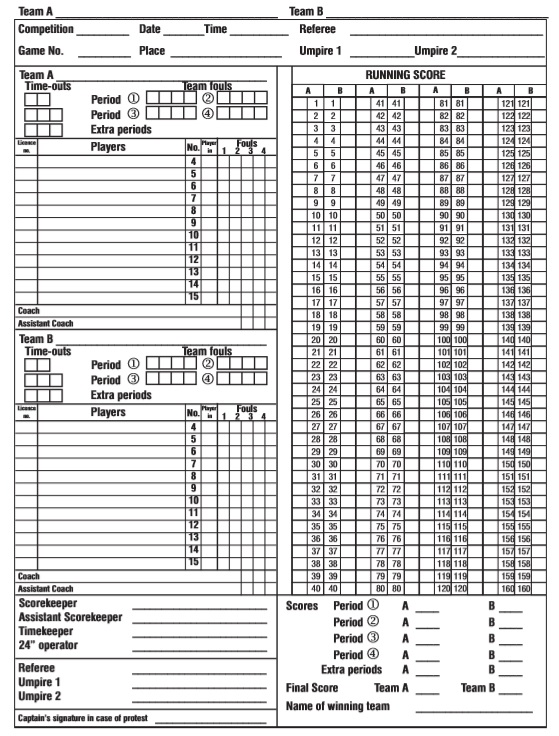
When you look at the templates I’ve put together, you’ll see I made sure to include dedicated spots for all the essential game metrics:
- The Running Score: A clear, linear grid where you can cross off points as they happen — which, by the way, is the absolute best way to avoid math errors when the action gets frantic.
- Player Rosters & Numbers: Clean lines to write down player names and jersey numbers for both the home team and the visitors.
- Personal Fouls: Individual tracking blocks to log fouls for each player so you know the exact moment someone is in danger of fouling out.
- Team Timeouts: Small check-boxes to keep tabs on how many timeouts have been used and how many are left in each half.
- Quarter-by-Quarter Breakdowns: Sections to tally up points at the end of every period to help coaches do some quick statistical analysis later on.
Why Use My Ready-Made Templates?
My over a decade of working with printable layouts tells me that usability is everything. If a template is too crowded, the scorekeeper is going to miss a play. I kept the fonts clean and made sure the grids are large enough to actually write in with a pencil during a live game.
Now, what I personally like about this collection is the flexibility. I didn’t just make one generic layout. I put together a few different variations — including an official style for tournament play and a simplified version that works beautifully for casual backyard games or youth leagues.
Every single file on this page is formatted for standard A4 and US Letter paper sizes. You can download them as a PDF if you just want to print it out and go, or grab the Word and Excel versions if you prefer to type in your team rosters before the season starts.
They are entirely free to use. No sign-ups, no registration, and no catch. Hopefully, this saves you some time and keeps your next game running smoothly.
Here is preview of This First Sample Basketball Score Sheet Template created using MS Word,


How to Set Up and Use Your Score Sheet?
I know this for sure from my own past experience — filling one of these out can feel a bit overwhelming if you try to do it all while the buzzer is ringing. It is a lot easier if you prep a few things ahead of time.
Here is how I usually break it down to keep things simple:
- Fill in the basics first: Before the game even starts, write down the team names, the date, the location, and the scheduled tip-off time. Don’t forget to add the coaches’ names too.
- Get the rosters lined up: List out the individual players along with their jersey numbers. This might sound obvious but it actually makes a real difference when you are trying to log a quick bucket.
- Track individual stats if you can: You have a choice here. You can just track the overall team score, or you can log points for each individual player per half. I always recommend tracking the individual players — well, unless it’s a super casual scrimmage — because it gives the coach much better data to look at later.
- Learn the referee signals: Logging points is easy. Tracking fouls and penalties is where people usually get tripped up. Make sure you understand standard referee hand signals and abbreviations so you don’t accidentally log a foul by mistake.
- Keep the running total separate: I always make sure there is a dedicated spot to tally up the team scores at the end of each half. It makes it incredibly simple to double-check your math.
- Lock in the final score: Once the game is over, write down the final totals in the main summary box. I like to write the winning team’s name nice and big so it stands out clearly on the page.
And honestly, once you do this once or twice, it becomes second nature. Feel free to use it however works best for your situation.
