Download these 13 free issue log templates to record, assign, monitor, and resolve problems that arise during projects, business operations, meetings, or ongoing work. The collection includes Microsoft Word and Excel formats suitable for project managers, team leaders, departments, contractors, and organizations that need a consistent way to track unresolved issues.
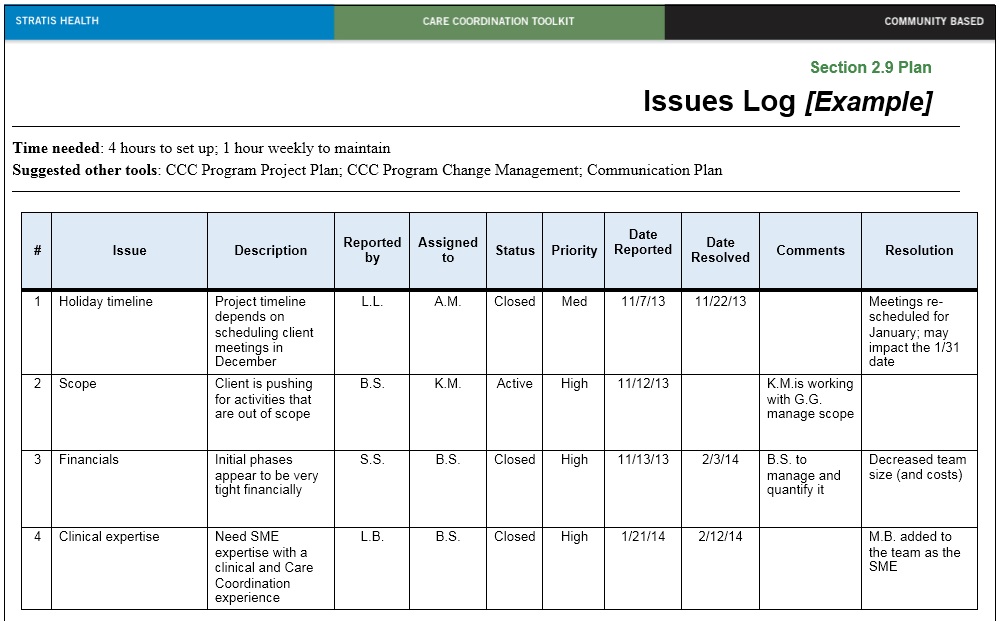
An issue log gives a team one central place to record problems that already exist and require attention. Instead of relying on emails, meeting notes, or memory, each issue can be assigned an identifier, owner, priority, status, due date, and resolution so everyone can see what still needs to be addressed.
If you need other structured records for ongoing work, browse our complete collection of free log templates. That section includes issue logs, action logs, daily logs, sales logs, and other tracking forms.
What Is an Issue Log?
An issue log is a project or operational tracking document used to record problems, obstacles, decisions, or exceptions that need investigation or resolution. It is commonly maintained throughout a project and updated as issues are identified, assigned, worked on, escalated, and eventually closed.
An issue might be a missed dependency, unavailable resource, technical problem, supplier delay, budget concern, unresolved decision, customer complaint, or any other situation that is already affecting the work.
The important point is that an issue represents something that requires attention now. Recording it in a structured log helps prevent it from being forgotten or discussed repeatedly without a clear owner or next step.
Why Use an Issue Log?
Projects often generate dozens of small problems that can become serious if nobody takes ownership of them. An issue log makes responsibility visible and allows managers to review unresolved items according to priority, age, department, owner, or impact.
The log can also create a useful history. After an issue is closed, the description, actions taken, and final resolution may help the team respond more effectively when a similar problem appears in the future.
What Should an Issue Log Include?
The exact fields depend on the project or organization, but an effective issue log should contain enough information to understand the problem, decide who is responsible, and monitor progress toward resolution.
Issue ID
Assign each issue a unique reference number or code. A simple sequence such as ISS-001, ISS-002, and ISS-003 makes it easier to refer to an issue in meetings, emails, reports, and project documentation.
Date Raised
Record when the issue was first identified. This helps managers see how long an item has remained unresolved and whether older issues need escalation.
Issue Description
Describe the problem clearly enough that someone unfamiliar with it can understand what has happened. Avoid vague entries such as “system problem” when you can state what system is affected, what is not working, and what the immediate consequence is.
Category
Categories make larger issue logs easier to filter and review. Examples may include technical, financial, supplier, resource, scheduling, customer, compliance, quality, or operational issues.
Priority or Severity
Use a consistent scale such as low, medium, and high, or another system defined by your organization. Priority normally reflects how urgently the issue needs attention, while severity may describe the scale of its impact.
Impact
Briefly record how the issue affects the project, schedule, budget, quality, customer, team, or another area. This helps decision-makers understand why the problem deserves attention.
Issue Owner
Every active issue should have a person responsible for coordinating its resolution. Without a clear owner, an issue can remain open even when everyone agrees that something needs to be done.
Action or Resolution Plan
Record what will be done next. This might include investigation, corrective work, requesting approval, contacting a supplier, changing a schedule, or assigning another action to a specialist.
Target Resolution Date
Add a target date where practical. The due date helps teams distinguish between an issue that is being actively managed and one that has simply remained on the log indefinitely.
Status
Typical status labels might include Open, In Progress, On Hold, Escalated, Resolved, and Closed. Keep the status list simple enough that team members use it consistently.
Resolution and Closure Date
Once the issue is resolved, document what was done and record the closure date. A short but clear resolution note is valuable if the issue is reviewed later.
13 Free Issue Log Templates
The following collection contains 13 existing PrintableSample downloads. The first five are identified as Microsoft Word formats, while the remaining eight are Microsoft Excel templates.
Some of the files are broader project-control tools, including a combined risk-and-issue log, problem log, issue-management template, and risk log. They are retained because they are useful alongside a standard issue register, but their titles below reflect their actual purpose.


How to Use an Issue Log Effectively
Creating the spreadsheet is only the first step. An issue log is useful when it becomes part of the team’s normal working process and is reviewed often enough to keep the information current.
Record Issues as Soon as They Are Identified
Do not wait until a weekly meeting to write down an important problem. Add the issue when it becomes known, even if the full solution is not yet clear.
You can update the description, priority, owner, or target date later as more information becomes available.
Assign One Clear Owner
An issue may involve several people, but one person should normally be responsible for coordinating the response. Assigning an issue to “the team” makes accountability difficult.
Prioritize Consistently
Define what Low, Medium, High, or Critical means before using those labels. For example, a high-priority issue might threaten a major deadline, customer commitment, budget, or essential deliverable.
A consistent priority scale makes it easier for managers to focus attention where it is most needed.
Update the Status Regularly
Review active issues during project meetings or another regular reporting cycle. Update the owner, target date, latest action, status, and escalation information whenever something changes.
If you need to track the follow-up tasks created by those discussions separately, use an action log template. An action log focuses on work that someone must complete, while the issue log focuses on the underlying problem that requires resolution.
Close Issues Properly
Do not simply delete resolved issues. Change the status to Closed, record the resolution, and add the closure date. Keeping closed entries creates a historical record and can help teams understand recurring problems.
Issue Log vs. Risk Log
An issue and a risk are closely related, but they are not the same thing. A risk is an uncertain event or condition that may affect the project in the future. An issue is a problem or situation that has already occurred and needs to be managed.
For example, “The supplier may deliver the equipment late” is a risk. If the promised delivery date passes and the equipment has not arrived, the delay becomes an active issue.
Some organizations combine risks and issues into one spreadsheet, which is why one of the downloads on this page is specifically a Risk and Issue Log. If you use a combined file, include a field that clearly identifies whether each entry is a risk or an active issue.
Issue Log vs. Action Log
An issue log records problems that require attention. An action log records specific tasks or follow-up activities that people have agreed to complete.
One issue can generate several actions. For example, an unresolved software defect may be the issue, while testing a patch, contacting the vendor, and notifying users are individual actions.
For that type of follow-up tracking, see our free action log templates.
Issue Log vs. Incident Report
An incident report normally documents a specific event that has already occurred, such as a workplace accident, equipment failure, safety event, security problem, or other incident requiring formal documentation.
An issue log is broader and may track technical, administrative, operational, scheduling, financial, or project problems over time. An incident may create an issue that later appears in the issue log, but the two documents serve different purposes.
If you need to document individual events rather than maintain an ongoing register, use one of our incident report templates.
Issue Log vs. Daily Log
A daily log records activities, observations, events, or work completed during a particular day. An issue log is selective: it focuses only on problems that need attention or resolution.
For example, a project manager might use a daily log template to document the day’s activities and then add only unresolved problems from that record to the issue log.
Using an Issue Log in Project Management
An issue log is most useful when it is connected to the rest of the project’s documentation. Important issues can affect scope, deadlines, budget, deliverables, resources, or stakeholder expectations.
At project initiation, teams may document objectives, responsibilities, scope, assumptions, and high-level risks in a project charter. Once execution begins, the issue log becomes one of the working documents used to manage problems that arise along the way.
Review Issues During Project Meetings
Before a status meeting, filter the log for open, overdue, high-priority, or escalated issues. This helps prevent the meeting from becoming a line-by-line reading of every item.
Focus discussion on issues that require decisions, resources, approvals, or coordination between different people or departments.
Use Filters in Excel
Excel issue logs are especially useful for larger projects because the data can be filtered by owner, status, department, priority, category, or target date.
Conditional formatting can also make overdue or high-priority issues easier to identify, although the spreadsheet should remain understandable even without decorative formatting.
Common Issue Log Statuses
A simple status system is usually better than a long list of overlapping labels. One practical workflow is:
- Open: The issue has been recorded but work has not yet started.
- In Progress: The assigned owner is actively working on the issue.
- On Hold: Progress is temporarily blocked or waiting for information.
- Escalated: The issue requires attention from a higher authority or another team.
- Resolved: A solution has been implemented but may still need confirmation.
- Closed: The solution has been verified and no further action is required.
Your organization may use different terminology, but the meaning of each status should be documented so everyone updates the log consistently.
Frequently Asked Questions About Issue Logs
1. What is an issue log?
An issue log is a structured document used to record and monitor problems that require investigation, action, or resolution during a project or ongoing business activity.
2. What information should an issue log contain?
Common fields include an issue ID, date raised, description, category, priority, impact, owner, proposed action, target resolution date, status, resolution, and closure date.
3. What is the difference between an issue and a risk?
A risk is something uncertain that may happen in the future. An issue is a problem or situation that has already occurred and requires attention.
4. Who should own an issue?
Each active issue should normally have one clearly identified owner responsible for coordinating the response and keeping the status current, even when several people are involved in the solution.
5. How often should an issue log be updated?
Update the log whenever important information changes and review active issues regularly during the project’s normal management cycle. High-priority or rapidly changing issues may need more frequent review.
6. Can an issue log be maintained in Excel?
Yes. Excel works particularly well for issue logs because entries can be sorted and filtered by priority, owner, status, category, dates, and other fields. Eight of the downloads on this page are identified as Excel templates.
7. What is the difference between an issue log and an action log?
An issue log tracks problems that need resolution, while an action log tracks specific tasks that people are responsible for completing. One issue may produce several action items.
8. Should resolved issues be deleted?
Usually it is more useful to keep resolved issues in the log with a Closed status, resolution note, and closure date. This preserves a record for future review and lessons learned.
9. What does it mean to escalate an issue?
Escalation means referring an issue to a person or group with greater authority, expertise, or resources because the current owner cannot resolve it within the required time or scope.
10. Can one spreadsheet contain both risks and issues?
Yes. Some teams maintain a combined risk-and-issue register. If you do this, add a clear field identifying the type of each entry so future risks are not confused with problems that have already occurred.
