Download these 11 free cricket score sheet templates to record runs, wickets, overs, batting performances, bowling figures, extras, and match results. The collection includes Microsoft Word, Excel, and PDF formats suitable for school cricket, local clubs, practice matches, leagues, tournaments, and recreational games.
A cricket scoresheet provides a structured record of what happens during an innings. It allows the scorer to follow the batting and bowling performance, record dismissals and extras, track the total score, and confirm the result when the match is complete.
If you need scoring forms for other games and sports, browse our free score sheet templates. That collection includes formats for cricket, bowling, chess, tennis, football, and other competitions.
What Is a Cricket Score Sheet?
A cricket score sheet, or cricket scorecard, is used to record the progress and result of a cricket match. It normally contains separate areas for batting, bowling, extras, wickets, overs, and the innings total.
Under the Laws of Cricket, two scorers are appointed to record all runs scored, wickets taken, and, where appropriate, the number of overs bowled. The scorers regularly compare their records and work with the umpires to confirm that the scores are correct.
For a casual game, one person may keep a simplified record, but an organized match usually benefits from a complete scoresheet that captures enough information to reconstruct the innings accurately.
Why Keep a Cricket Scoresheet?
A scoresheet provides much more information than the final team total. It shows how individual batters performed, which bowlers took wickets, how many extras were conceded, when wickets fell, and how the innings developed over time.
Coaches and players can use completed scorecards to review performance after a match. The information may help identify strong partnerships, productive bowlers, high-scoring batters, frequent extras, or periods when the run rate changed.
For other sports where detailed scoring is important, PrintableSample also provides bowling score sheets and other printable scoring forms through the main score-sheet collection.
What Should a Cricket Score Sheet Include?
The exact layout depends on the type and length of the match, but a useful cricket scoresheet normally includes several key sections.
Match Information
Start with basic details such as the names of the teams, date, venue, competition or league, and match format. Some scorecards also provide fields for captains, toss result, umpires, scorers, and innings order.
Batting Scorecard
The batting section lists each batter and records how that player was dismissed, the bowler or fielder involved where applicable, and the runs scored.
More detailed scorecards may also include balls faced, boundaries, strike rate, or other statistics, depending on the level and format of play.
Bowling Figures
The bowling section records each bowler’s contribution. Typical fields include overs, maidens, runs conceded, wickets, and sometimes wides, no-balls, economy rate, or other statistics.
Extras
Runs not credited to a batter are recorded as extras. Depending on what occurs during the innings, these may include wides, no-balls, byes, leg byes, and penalty runs.
Keeping extras separate helps ensure that the batting totals and overall innings total reconcile correctly.
Fall of Wickets
A fall-of-wickets section can record the team score when each wicket falls and, where required, the batter dismissed or the relevant over. This provides a quick picture of how the innings progressed.
Overs and Innings Total
The score sheet should show the number of overs completed and the final total of runs and wickets. Depending on the match format, it may also include over-by-over totals or a running score.
11 Free Cricket Score Sheet Templates
The following collection contains 11 cricket scoring templates from the existing PrintableSample page. The first three are identified as Microsoft Word files, the next four as Microsoft Excel spreadsheets, and the final four as PDF formats.
Word templates can work well for straightforward printable scorecards, while Excel is useful when you want a structured spreadsheet that can be updated electronically. PDF forms can be convenient when you mainly need a ready-to-print scoresheet.


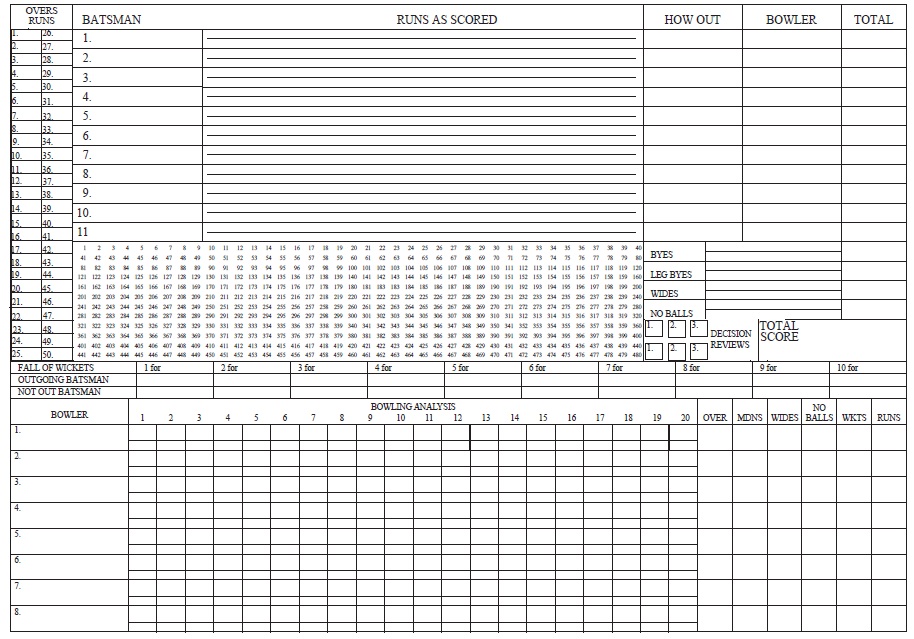


11. Printable Cricket Scoresheet PDF

File Type: PDF (ZIP File)
Source: Printablepaper.net
How to Use a Cricket Score Sheet
Before the match begins, enter the team names, venue, date, competition, and any other identifying information required by the scorecard. Confirm which team will bat first and prepare the batting and bowling sections accordingly.
During the innings, record each scoring event carefully. Runs scored by the batter should be credited to that player, while extras should be placed in their appropriate category. When a wicket falls, record the dismissal accurately and update the team total.
The bowling figures should be updated throughout the innings so that runs conceded, wickets, and overs remain consistent with the batting and team totals.
Record Every Delivery Accurately
Detailed scorebooks often use symbols or shorthand to record the outcome of each delivery. A delivery may result in runs, a dot ball, an extra, or a wicket, and the scorer needs to ensure that the same event is reflected correctly in the batting, bowling, and team totals.
Accuracy matters because one scoring event can affect several parts of the scorecard. For example, a boundary changes the batter’s score, the bowler’s figures, and the innings total at the same time.
Check the Totals Regularly
Do not wait until the end of the innings to discover that the figures do not match. Regular checking makes errors easier to locate and correct.
In formal cricket, the appointed scorers compare their records frequently. They also agree the scores with the umpires at specified points, including the conclusion of the match.
Understanding the Batting Section
The batting section should show each player’s contribution to the innings. A typical scorecard lists the batter’s name, method of dismissal, runs scored, and sometimes balls faced and boundaries.
The dismissal description is important. Depending on what happened, a batter might be recorded as bowled, caught, run out, stumped, leg before wicket, or another valid form of dismissal.
Players who do not bat may be marked accordingly, while a batter still at the crease when the innings ends is generally shown as not out.
Understanding the Bowling Section
The bowling section summarizes each bowler’s performance. At a basic level, this normally includes overs bowled, runs conceded, and wickets taken.
More detailed scorecards may also provide columns for maidens, wides, no-balls, economy rate, or other statistics.
Remember that not every run added to the innings total is charged to the bowler in the same way. Correct handling of extras is one reason a structured score sheet is useful.
Extras on a Cricket Score Sheet
Extras are runs added to the team’s total that are not credited as runs scored from the bat. A score sheet may provide separate spaces for wides, no-balls, byes, leg byes, and penalty runs.
Keeping these categories separate is important because they can affect the bowler’s figures differently and are needed when checking that the total score reconciles with the individual batting figures.
Using Cricket Scoresheets for Different Match Formats
The same basic scoring principles apply across different forms of cricket, but the most convenient layout may vary according to the match.
Junior and School Cricket
A simplified score sheet may be easier for junior players, teachers, or school competitions. The sixth and ninth templates in this collection are particularly relevant to youth and eight-a-side cricket.
Twenty20 Cricket
T20 matches use a limited number of overs, so a scoresheet designed specifically for Twenty20 cricket can make it easier to record a complete innings in a compact layout. Template 10 in this collection is designed for that purpose.
Club and Longer Matches
Club and longer-format games may benefit from larger scorebooks with more room for individual deliveries, partnerships, fall of wickets, and detailed bowling figures.
Paper vs. Excel Cricket Score Sheets
Paper score sheets remain practical for school matches, local clubs, practice games, and situations where a computer is not available. They can be printed in advance and completed by hand at the ground.
Excel templates can be more useful when results need to be stored electronically or when a club wants to calculate, sort, or archive match information on a computer.
Regardless of the format, the important part is that the score remains accurate and that all sections of the scorecard reconcile with the final innings total.
Using Completed Scoresheets for Player Analysis
A completed cricket scorecard can help coaches and players review individual and team performance after the match.
Batting figures can show who contributed runs, who occupied the crease, and where wickets fell. Bowling figures can highlight wicket-taking bowlers, economical spells, and problems with wides or no-balls.
Comparing scoresheets over several matches can also reveal patterns that may not be obvious from a single result.
Frequently Asked Questions About Cricket Score Sheets
1. What is a cricket score sheet?
A cricket score sheet is a document used to record the progress of a cricket match, including batting scores, bowling figures, extras, wickets, overs, and the final innings total.
2. What information goes on a cricket scorecard?
A typical cricket scorecard contains team and match information, batter names and scores, methods of dismissal, bowling figures, extras, fall of wickets, overs, and the final result.
3. How many scorers are used in a cricket match?
Under the current Laws of Cricket, two scorers are appointed to record runs scored, wickets taken, and, where appropriate, the number of overs bowled. They regularly check that their records agree.
4. What are extras in cricket scoring?
Extras are runs added to the batting team’s total that are not credited to the batter in the normal way. They may include wides, no-balls, byes, leg byes, and penalty runs.
5. What does the fall of wickets section show?
The fall-of-wickets section records the team score at which each wicket was lost. Depending on the scorecard, it may also identify the dismissed batter or the over in which the wicket fell.
6. Can I use Excel for cricket scoring?
Yes. Excel is useful for maintaining electronic match records and organizing batting, bowling, and team statistics. Four of the templates on this page are identified as Microsoft Excel formats.
7. Are these templates suitable for school cricket?
Yes. Several can be adapted for school or junior games, and the collection includes a junior cricket scoresheet and an eight-a-side cricket score sheet.
8. Is there a separate score sheet for Twenty20 cricket?
Yes. Template 10 in this collection is specifically presented as a Twenty20 scoresheet and can be used as a starting point for T20 match scoring.
9. Why should scorers check their totals during the innings?
Regular checking helps detect errors while the relevant events are still fresh. It is easier to correct a discrepancy during the innings than to reconstruct an entire match after play has finished.
10. Can completed cricket score sheets be used for player analysis?
Yes. Batting and bowling figures, extras, wickets, and innings progression can help players and coaches review performance and identify areas for improvement.

Pingback: Free Football Score Sheet Templates – 13 Word, Excel & PDF Forms